
Answering on behalf of all participants
By answering questions on the master questionnaire, you can ensure that those answers are added to the prefilled questionnaires of every participant at once.
-
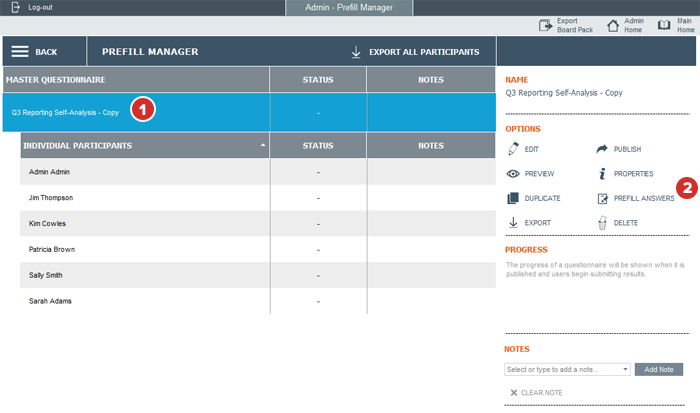
In the Prefill Manager, select the Master Questionnaire.
-
Select Prefill Answers.
-
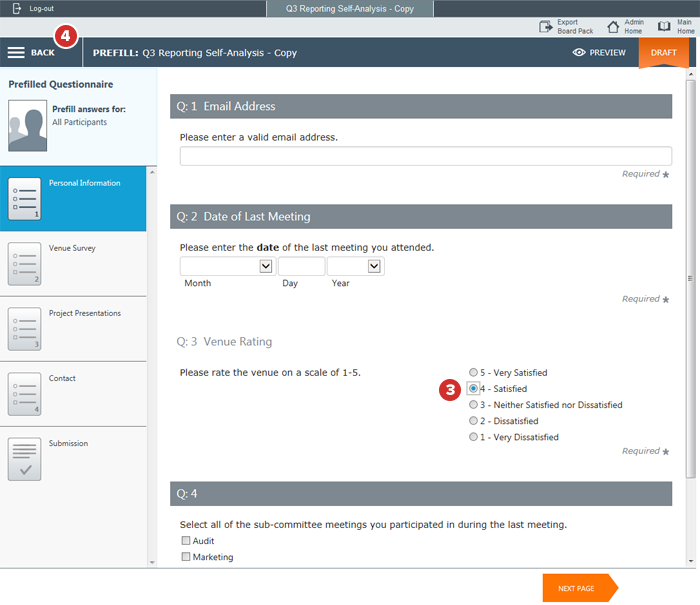
Your questionnaire opens. Fill it out as if you were taking the questionnaire. You don't have to answer every question (including required questions) if you don't think that answer will apply to everyone.
Note
If you've already prefilled answers for any specific participants, and then answer the same questions in the master, the new answer from the master will overwrite the older, participant-level answer.
Note
If you don't answer a required question, the participant will still have to answer it before they can submit their questionnaire.
-
Prefilled answers will save automatically. When you're done, select Back.
Note
When prefilling table questions on the master questionnaire, any changes made will apply the entire master table (including blank cells) to every individual table. Use extra caution when prefilling table questions on the master questionnaire, especially when table questions have previously been prefilled at the individual level, as any data at the individual level will be overwritten by the master table.
Note
It is strongly recommended to only prefill new table questions, which have not been previously answered or prefilled at the individual level, on the master questionnaire.
