
Director Network group invitation (non-user)
When a group administrator invites a member, who is not currently a user of Director Network or a Diligent client, to join a group, they receive the following invitation:

-
Select Review Invite.
Note
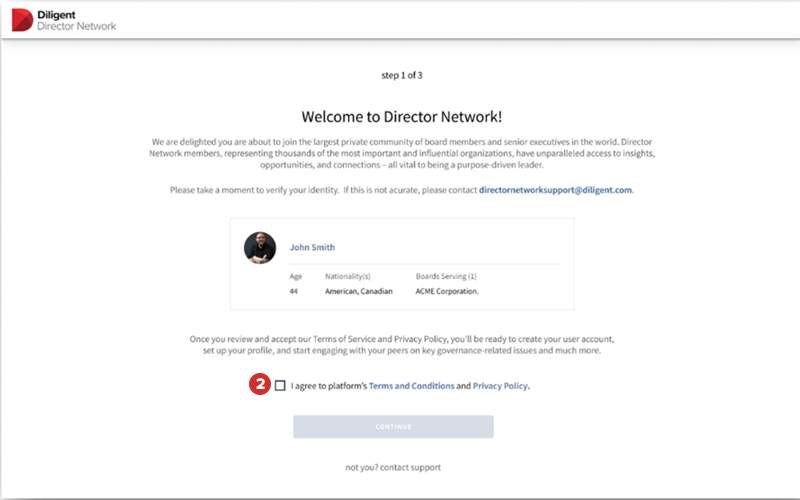
Analysts have already verified your information and created your profile for you to claim.
-
Select I agree to platform's Terms and Conditions and Privacy Policy checkbox and select Continue.
Note
If the account shown is not yours, contact DirectorNetworkSupport@diligent.com.
-
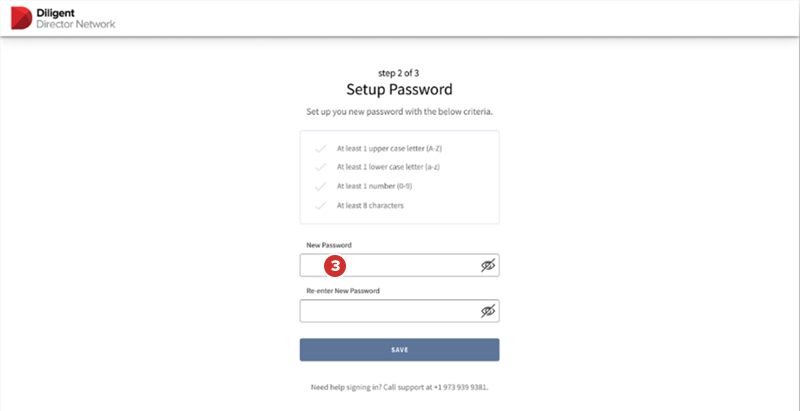
In the Password fields, enter and re-enter a password for your account, and select Save.
-
After you create your account, the system automatically claims your profile for you, and you are redirected to the groups page that you were invited to. The groups page presents the user with three options to choose from:
-
Decide Later: You can explore the group and decide whether you would like to join or not later. You can also choose to decide later by navigating away from that page.
-
Decline
-
Accept and join
Note
Diligent hides the existing activity of the Feed section on the group page until you decide to become a member of the group.
-
-
(Optional) If you select Decide Later and then want to join the group later, select the Groups tab, and select Accept. The group that you were invited to join remains at the top of the Groups page.
-
(Optional) If you select Decide Later and then want to reject joining the group later, select the Groups tab, and select Reject. The group that you were invited to join remains at the top of the Groups page.
