
Audit fieldwork
The Audit fieldwork section in the Audit app provides you with a dedicated workspace to execute your audits after detailed scoping is complete, assigning and managing tests and tracking their progress in one board. After you close the audit, you can summarize and share the results for an audit report.
This section allows Audit Managers to access a consolidated list of audits, which includes key details such as status, dates, budgeted hours, and linked objects, such as plans, auditable entities, controls, control tests, findings, and actions. For more information about audit role permissions, go to Audit app permissions.
Workflow
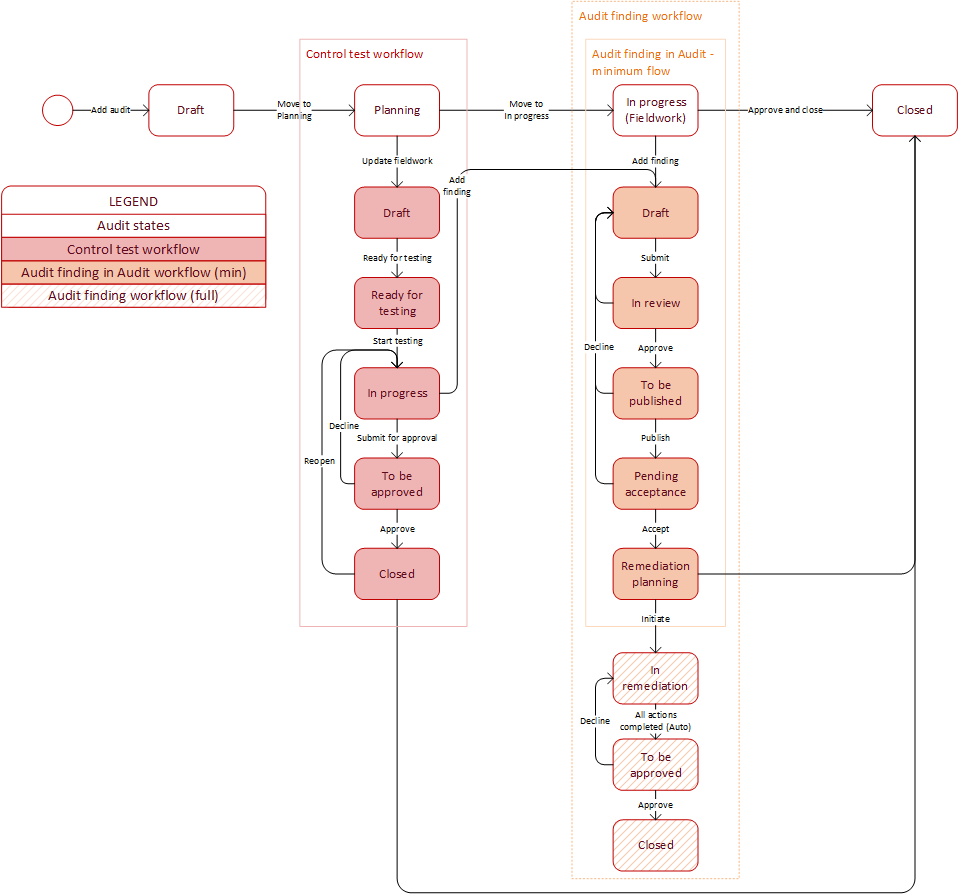
To get a detailed understanding of the workflow of an audit, see the workflow diagram and table below:
| Status | Description |
|---|---|
| Draft (high-level planning) | The audit has been added. Start and end dates are set and at least one auditable entity is scoped for next transition. |
| Planning (high-level planning) | Detailed scoping of controls and control tests. After confirming the scope, fieldwork cards are generated. |
| In progress (Fieldwork) | Control testing is underway and findings are raised. Linked control tests can be put In progress only once the audit is In progress. |
| Closed | The audit has been approved and closed; the overall rating is recorded. Audit findings are accepted. |
Connections
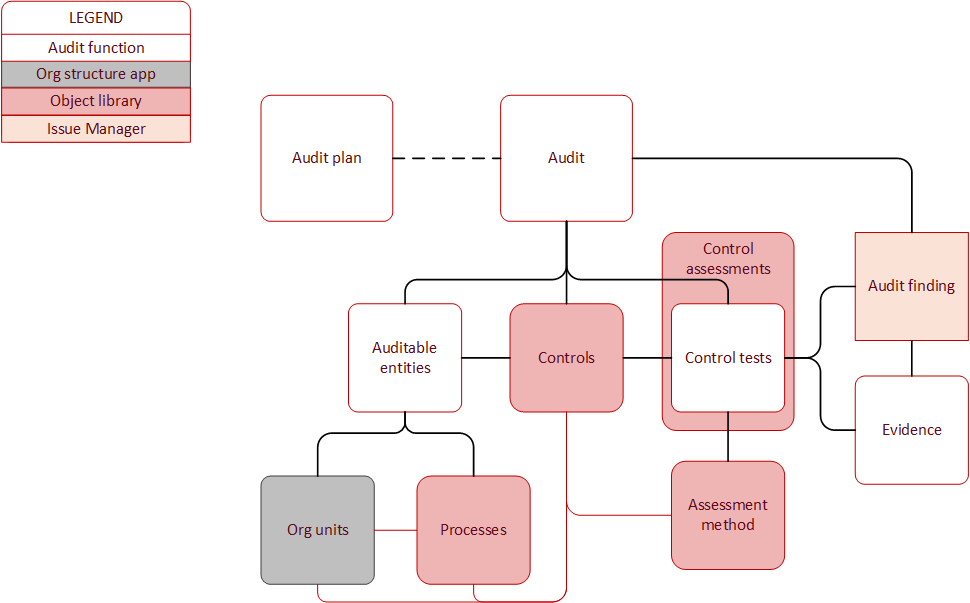
To get an understanding of the connections between the audit fieldwork functions, objects, and other sections of the app, see the diagram below.
Note
Lines between functions, objects, and app sections indicate the type of connection:
-
A solid black line indicates a general direct connection.
-
A solid red line indicates a connection through the Object library section.
-
A dashed line between Audit and Audit plan indicates that an audit can be created without an audit plan.
Key features
Here are the key features of Audit fieldwork:
-
Manage audits Audit managers can define the initial, high-level scope of an engagement by deciding which controls to include in the audit and plan the resources needed in the Audit app with no need for spreadsheets.
-
Testing controls and progress overview View the current status through summary statistics and a Kanban-style board of control tests by state, helping you monitor which work is progressing or being blocked. Assign control tests to individual team members and perform the control tests and linked control assessments, all while keeping their progress visible in one place.
-
Closing the audit and sharing results Summarize audit findings, capture management responses, plan remediation, and generate audit reports for easy sharing.
