
Object library
The Object library is a shared repository of GRC objects that you can access from within the Audit, Risk Manager, or Internal Controls apps. It provides a consistent source of truth for objects such as controls, assessment methods, processes, control assessments, audit findings, and actions.
Object library in Audit
The Object library supports Audit activities by making shared control and object metadata available directly in Audit. When you open a shared object from the library, Audit preserves the navigation and workflow context. Object ownership remains with the source application, but Audit users can still access and use the object's details. The Object library is designed to feel native to Audit, with direct links from audit scoping and object lists to shared object details.
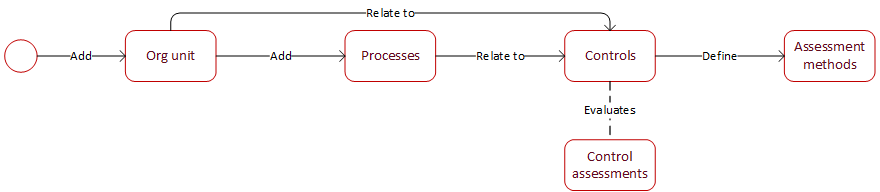
For an overview of the objects and the workflow in managing these objects, see the workflow diagram and table below:
| Object | Description |
|---|---|
| Org unit | A structural business entity from Org Structure that Audit uses as a building block for auditable entities and audit-universe definition; auditable entities can be based on org units alone or org units combined with processes. |
| Processes | Shared process records used to define auditable entities and support control selection and audit scoping. |
| Controls | A control implemented by an organization to mitigate risks, ensure objectives are achieved, and maintain compliance with laws, regulations, and internal standards. |
| Control assessments | They represent the specific tests performed against controls. Control assessments initiated within an audit are known as control tests. |
| Assessment methods | The test methodology attached to a control assessment. Defines how a control’s design and operational effectiveness are evaluated and what validation rules or results apply during testing. |
Key features
Here are the key features of Object library:
-
Browse shared objects View controls, assessment methods, processes, control assessments, and audit findings from the shared Object library.
-
Access control details Select a control name from scoping or control test lists to open the related Object library item.
-
Use shared relationships Review relationships between objects, such as controls and assessment methods, while staying inside the associated app.
-
Maintain entitlement independence Your chosen app can consume shared objects without requiring separate entitlements or permissions.
-
Find controls from Audit scoping If no controls exist yet, use the control library link to access shared controls from the Object library.
