
Document review cycle
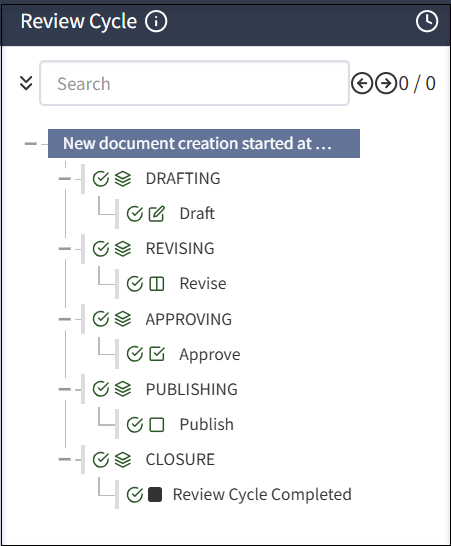
The document review cycle includes the following phases and phase-related tasks: DRAFTING, REVISING, APPROVING, PUBLISHING, and CLOSURE.
Best practice for managing review cycles
Puede asignar individuos a filas de revisión en función de su tarea, como revisores, aprobadores o alguna otra acción. Por ejemplo, puede tener diferentes individuos en filas como Revisión de RR. HH., Aprobador de RR. HH., Revisor de asuntos legales y Aprobador de asuntos legales. Así, puede asignar un documento a los individuos correctos en la fase adecuada del ciclo de revisión.
La exhaustividad de la revisión de la documentación depende de las capas o la cola de revisión añadidas al revisar un documento en particular.
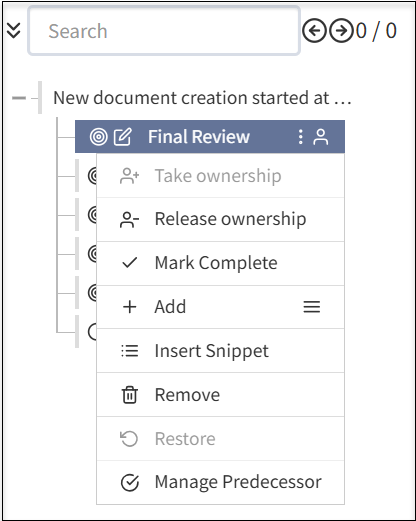
Cuando se crea una fila de revisión, puede hacer lo siguiente:
- Completar una revisión final asignando una persona o poseyendo grupos.
- Tomar posesión: asígneselo para editar la documentación.
- Titularidad de la liberación: libérese de editar la documentación.
- Marcar como completo: marque la revisión del documento como completa.
- Agregar: seleccione el icono de menú para agregar subsecciones adicionales al documento. Los pasos adicionales incluyen los siguientes campos:
- Agregar sección: agregue una nueva sección a su documento para completar la revisión del documento.
- Agregar paso: agregue nuevos pasos a la sección existente en el documento.
- Agregar edición: agregue un componente de edición adicional a su documento.
- Agregar aprobaciones: agregue un nivel de aprobación adicional antes de completar el ciclo de revisión de documentos.
- Agregar revisión: agregue una capa adicional para revisar el documento antes de marcarlo como Completo.
- Añadir cierre : agregue una capa adicional para cerrar antes de marcar el documento como completo.
- Añadir fragmento: añade fragmentos para su documentación.
- Quitar: elimina las capas que agregó para su documentación según su requisito.
- Restaurar: restaura la versión anterior del documento, si ha eliminado accidentalmente una sección o capa mientras realiza la revisión del documento.
- Gestionar el predecesor: puede asignar la tarea predecesora antes de completar un ciclo de revisión de documentos.
Se recomienda asignar una fila de personas para la propiedad de documentos y otra para la propiedad de tareas para definir con claridad revisores, aprobadores y propietarios de documentos.
It is recommended that Administrators select Enable Auto-assign to each phase of a review cycle to ensure someone has ownership.
Always close out a review cycle. If you do not, the cycle will appear to be open indefinitely. If you have a centralized policy team that manages policies, it is a best practice for that team to start (DRAFTING phase) and close out (CLOSURE phase) a review cycle. If you have a decentralized team, ensure that someone is responsible to close the review cycle.
Tasks in review cycle phases
In each phase, you can have any number and types of tasks. Certain types of tasks can only be added under certain phases, for example, approval task must under APPROVING phase.
The components of tasks in a review cycle includes the following:
- Checkmarks: Select the checkmark
 to complete phases and tasks.
 - Clock: Select the
 clock button to see the date and time for each completed phase.
 - Info: Select the
 info button to see the review flow assigned.
Drafting
In the DRAFTING phase, a document may be written for the first time, or reviewed at the start of a review cycle. To speed drafting, reusable content such as components and widgets can be used. After the DRAFTING phase is complete, the document moves to the next phase and does not return to the DRAFTING phase. For more information, see Creating a document.
Revising
In the REVISING phase, the document is iteratively reviewed and revised. Reviewers in a review queue add comments and may have rights to enter edits in the document. Multiple people are typically involved in a review and several iterations of the review are often required. If a change is made after earlier reviewers have approved the document, the system detects the change, resets the review cycle at the appropriate point, and notifies involved reviewers to view and approve the change.
The REVISING phase is complete when all reviewers have approved the same, final document. For more information, see Revising a document.
Approving
In the APPROVING phase, people in assigned queues examine the document and either approve or do not approve the document and comment on any issues. If the document is not approved, the system reopens the revising phase and notifies appropriate reviewers.
The system manages as many revising/approving cycles as necessary. The APPROVING phase is complete once all approvals are given. For more information, see Approving a document.
Publishing
In the PUBLISHING phase, the document cannot return to an earlier phase. Publishing a document can trigger dependent document review cycles. For more information, see Publishing a document.
Closure
In the CLOSURE phase, any business tasks related to ending the review cycle are executed and the review cycle is complete. The system will initiate a subsequent review based on the review frequency. For more information, see Publishing a document.
Off-cycle reviews
If a document needs to be updated before the next review date, you can start an off-cycle review. For more information, see Starting an off-cycle review.
Due dates and To Dos
At any point, you can select the Review Cycle tab then a task to view the Due by date and who the document will be routed to next in the right pane.
In To Do, select Add to add a reminder for the task and a due date, such as consult a colleague. You can also add notes. If you have active or pending To Do items, you cannot select the Done with Task to close the task.
