
Managing review queues
A Policy Manager review queue is one or a group of users to assigned to handle the review, approval, or other actions. Every person in the review queue will receive a review notification but only one person takes ownership.
A user cannot be assigned to a task. A review queue with at least one user is assigned to a task and a member of the review queue must take ownership of a task to complete the task. The owner of the task may release ownership for another user in the queue to assume ownership.
You must set up a review queue before the queue can be added to a review task.
[レビュー担当者]、[承認者]、その他のアクションなどのタスクに基づいて、レビュー キューに個人を割り当てます。たとえば、[人事レビュー]、[人事承認]、[法務レビュー]、[法務承認]のようなキューに、さまざまな個人を割り当てることができます。こうすることで、レビュー サイクルの適切なフェーズで、ドキュメントを適切な個人に割り当てることができます。
ドキュメント レビューの完全性は、特定のドキュメントのレビュー中に追加されるレイヤーまたはレビュー キューに依存します。
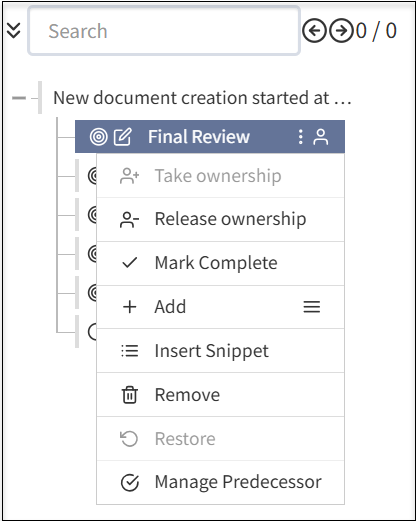
レビュー キューが作成されると、以下を実行できます。
- 個人または所有グループを割り当てて、最終レビューを完了します。
- 所有権の取得:ドキュメントを編集するために自分自身に割り当てます。
- 所有権のリリース:自分自身をドキュメントの編集からリリースします。
- 完了にする:ドキュメント レビューを完了としてマークします。
- 追加:メニュー アイコンを選択して、ドキュメントにサブセクションを追加します。追加の手順には、次のフィールドが含まれます。
- セクションを追加:ドキュメントに新しいセクションを追加して、ドキュメント レビューを完了します。
- ステップを追加:ドキュメント内の既存のセクションに新しいステップを追加します。
- 編集を追加:ドキュメントに編集コンポーネントを追加します。
- 承認を追加:ドキュメント レビュー サイクルを完了する前に、追加の承認レベルを追加します。
- 改訂を追加:完了としてマークする前に、ドキュメントを改訂するためのレイヤーを追加します。
- クローズを追加:ドキュメントを完了としてマークする前にクローズするレイヤーを追加します。
- スニペットを挿入:ドキュメントのスニペットを追加します。
- 削除:要件に従って、ドキュメントに追加したレイヤーを削除します。
- 復元:ドキュメント レビューの実行中に誤ってセクションまたはレイヤーを削除した場合、ドキュメントの以前のバージョンを復元します。
- 先行を管理:ドキュメント レビュー サイクルを完了する前に先行タスクを割り当てることができます。
レビュー担当者、承認者、ドキュメント所有者を明確に定義するために、ドキュメント所有者とタスク所有者にそれぞれ別の人のキューを割り当てることを推奨します。
Add a review queue
From the left navigation menu, select Administration, > Review Queues.
Select the Review Queues
 button.
Complete the information for the queue
Enter a Name for the queue and add a Description.
Select the Type to identify document ownership and task assignment functions for the queue. For example, Compliance may own a document but various review queues, including a compliance review queue, may accept tasks for review.
For Document Ownership Only: Individuals can own a document but will not be involved in reviewing tasks in a review cycle. Use this selection to assign ownership to a stakeholder or group that isn't an active user of Policy Manager. For example, this may be a Board or Committee of the Board that is the owner and primary stakeholder of a document but will never use Policy Manager and, instead, will have another group of users be responsible for document life cycle management.
For Task Assignment Only: Individuals will only be assigned tasks and can take ownership of a task. Individuals in the queue do not own the document.
Available for Both: The queue owns the document and can be involved in task actions.
- Select Active for the queue to be made available immediately. If a queue is active, it cannot be deactivated if it is used in one or more flows.
Select a Flow Definition (a Review Flow). For more information, see Managing review flows and tasks.
Select the Save Case Queue button.
Add or remove uses from the queue, as needed:
To add users to the queue, search for the user in All Other Users. Select the Action
 button for the user. The user moves to Current Users.
- To remove users to the queue, search for the user in Current Users. Select the Action button for the user. The user moves to All Other Users.
Manage a review queue
From the left navigation menu, select Administration > Review Queues.
Select any of the following:
 Edit to update the information.
 To add users to the queue, search for the user in All Other Users. Select the Action
button for the user. The user moves to Current Users.- To remove users to the queue, search for the user in Current Users. Select the Action button for the user. The user moves to All Other Users.
If Active is selected, the review queue is available for task assignment. You can deselect Active. The system will not allow you to inactivate a review queue that is currently in active use.
 Clone the review queue. You can edit the cloned review queue to make a new review queue.
 Delete to remove the review queue. The system will not allow you to inactivate a review queue that is currently in active use.
