
Document review cycle
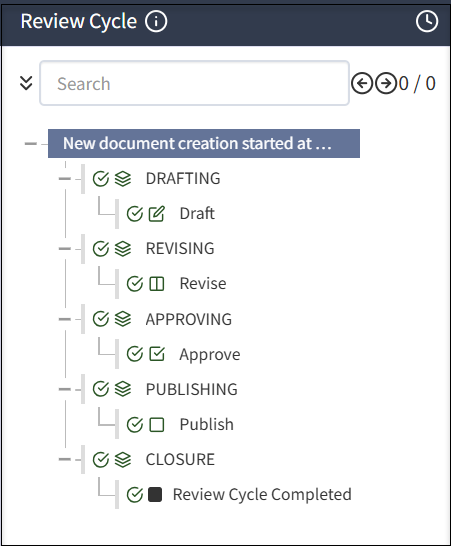
The document review cycle includes the following phases and phase-related tasks: DRAFTING, REVISING, APPROVING, PUBLISHING, and CLOSURE.
Best practice for managing review cycles
Você pode atribuir indivíduos a filas de revisão com base na tarefa, como Revisores, Aprovadores ou outra ação. Você pode ter, por exemplo, indivíduos diferentes em filas como Revisão do RH, Aprovação do RH, Revisão do Jurídico e e Aprovação do Jurídico. Assim, você pode atribuir um documento aos indivíduos corretos na fase adequada do ciclo de revisão.
A integridade da revisão da documentação depende das camadas ou da fila de revisão adicionadas durante a revisão de um determinado documento.
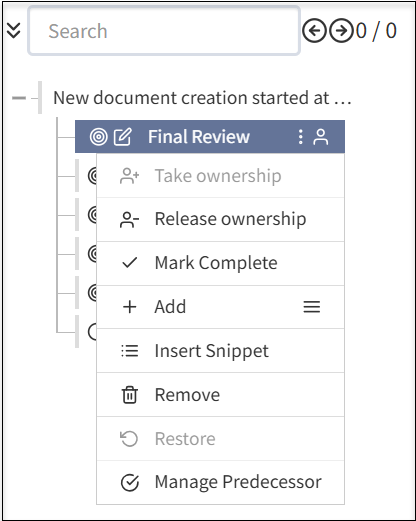
Quando uma fila de revisão for criada, você poderá fazer o seguinte:
- Complete uma Revisão Final atribuindo uma pessoa ou grupos proprietários.
- Assumir propriedade: Designe-o para editar a documentação.
- Liberar propriedade: Libere-se da edição da documentação.
- Marcar como concluído: Marcar a revisão do documento como completa.
- Adicionar: Selecione o ícone de menu para adicionar subseções adicionais ao documento. As etapas adicionais incluem os seguintes campos:
- Adicionar Seção: Adiciona uma nova seção ao documento para concluir a revisão do documento.
- Adicionar Etapa: Adiciona novos passos à seção existente no documento.
- Adicionar Editar: Adiciona um componente de edição adicional ao seu documento.
- Adicionar aprovador: Adiciona um nível de aprovação adicional antes de concluir o ciclo de revisão de documentos.
- Adicionar Revisar: Adiciona camada adicional para revisar o documento antes de marcar como concluído.
- Adicionar Fechar: Adiciona camada adicional para fechar antes de marcar o documento como concluído.
- Inserir Snippet: Adiciona snippet à sua documentação.
- Remover: Remove as camadas que adicionou na sua documentação de acordo com a sua exigência.
- Restaurar: Restaura a versão anterior do documento, se tiver excluído acidentalmente uma seção ou camada durante a revisão do documento.
- Gerenciar Anterior: Você pode atribuir uma tarefa anterior antes de concluir um ciclo de revisão de documentos.
A recomendação é atribuir uma fila de pessoas para a propriedade do documento e outra para a propriedade da tarefa, definindo claramente os revisores, aprovadores e proprietários dos documentos.
It is recommended that Administrators select Enable Auto-assign to each phase of a review cycle to ensure someone has ownership.
Always close out a review cycle. If you do not, the cycle will appear to be open indefinitely. If you have a centralized policy team that manages policies, it is a best practice for that team to start (DRAFTING phase) and close out (CLOSURE phase) a review cycle. If you have a decentralized team, ensure that someone is responsible to close the review cycle.
Tasks in review cycle phases
In each phase, you can have any number and types of tasks. Certain types of tasks can only be added under certain phases, for example, approval task must under APPROVING phase.
The components of tasks in a review cycle includes the following:
- Checkmarks: Select the checkmark
 to complete phases and tasks.
 - Clock: Select the
 clock button to see the date and time for each completed phase.
 - Info: Select the
 info button to see the review flow assigned.
Drafting
In the DRAFTING phase, a document may be written for the first time, or reviewed at the start of a review cycle. To speed drafting, reusable content such as components and widgets can be used. After the DRAFTING phase is complete, the document moves to the next phase and does not return to the DRAFTING phase. For more information, see Creating a document.
Revising
In the REVISING phase, the document is iteratively reviewed and revised. Reviewers in a review queue add comments and may have rights to enter edits in the document. Multiple people are typically involved in a review and several iterations of the review are often required. If a change is made after earlier reviewers have approved the document, the system detects the change, resets the review cycle at the appropriate point, and notifies involved reviewers to view and approve the change.
The REVISING phase is complete when all reviewers have approved the same, final document. For more information, see Revising a document.
Approving
In the APPROVING phase, people in assigned queues examine the document and either approve or do not approve the document and comment on any issues. If the document is not approved, the system reopens the revising phase and notifies appropriate reviewers.
The system manages as many revising/approving cycles as necessary. The APPROVING phase is complete once all approvals are given. For more information, see Approving a document.
Publishing
In the PUBLISHING phase, the document cannot return to an earlier phase. Publishing a document can trigger dependent document review cycles. For more information, see Publishing a document.
Closure
In the CLOSURE phase, any business tasks related to ending the review cycle are executed and the review cycle is complete. The system will initiate a subsequent review based on the review frequency. For more information, see Publishing a document.
Off-cycle reviews
If a document needs to be updated before the next review date, you can start an off-cycle review. For more information, see Starting an off-cycle review.
Due dates and To Dos
At any point, you can select the Review Cycle tab then a task to view the Due by date and who the document will be routed to next in the right pane.
In To Do, select Add to add a reminder for the task and a due date, such as consult a colleague. You can also add notes. If you have active or pending To Do items, you cannot select the Done with Task to close the task.
