
Managing review queues
A Policy Manager review queue is one or a group of users to assigned to handle the review, approval, or other actions. Every person in the review queue will receive a review notification but only one person takes ownership.
A user cannot be assigned to a task. A review queue with at least one user is assigned to a task and a member of the review queue must take ownership of a task to complete the task. The owner of the task may release ownership for another user in the queue to assume ownership.
You must set up a review queue before the queue can be added to a review task.
Você pode atribuir indivíduos a filas de revisão com base na tarefa, como Revisores, Aprovadores ou outra ação. Você pode ter, por exemplo, indivíduos diferentes em filas como Revisão do RH, Aprovação do RH, Revisão do Jurídico e e Aprovação do Jurídico. Assim, você pode atribuir um documento aos indivíduos corretos na fase adequada do ciclo de revisão.
A integridade da revisão da documentação depende das camadas ou da fila de revisão adicionadas durante a revisão de um determinado documento.
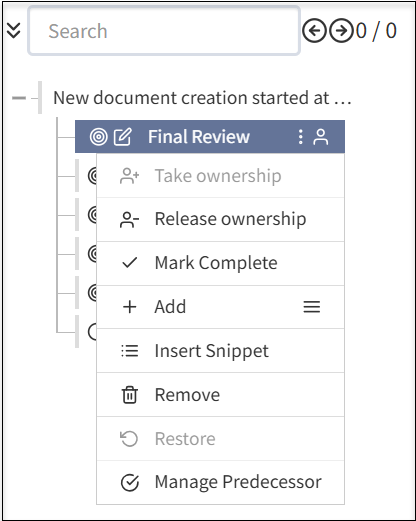
Quando uma fila de revisão for criada, você poderá fazer o seguinte:
- Complete uma Revisão Final atribuindo uma pessoa ou grupos proprietários.
- Assumir propriedade: Designe-o para editar a documentação.
- Liberar propriedade: Libere-se da edição da documentação.
- Marcar como concluído: Marcar a revisão do documento como completa.
- Adicionar: Selecione o ícone de menu para adicionar subseções adicionais ao documento. As etapas adicionais incluem os seguintes campos:
- Adicionar Seção: Adiciona uma nova seção ao documento para concluir a revisão do documento.
- Adicionar Etapa: Adiciona novos passos à seção existente no documento.
- Adicionar Editar: Adiciona um componente de edição adicional ao seu documento.
- Adicionar aprovador: Adiciona um nível de aprovação adicional antes de concluir o ciclo de revisão de documentos.
- Adicionar Revisar: Adiciona camada adicional para revisar o documento antes de marcar como concluído.
- Adicionar Fechar: Adiciona camada adicional para fechar antes de marcar o documento como concluído.
- Inserir Snippet: Adiciona snippet à sua documentação.
- Remover: Remove as camadas que adicionou na sua documentação de acordo com a sua exigência.
- Restaurar: Restaura a versão anterior do documento, se tiver excluído acidentalmente uma seção ou camada durante a revisão do documento.
- Gerenciar Anterior: Você pode atribuir uma tarefa anterior antes de concluir um ciclo de revisão de documentos.
A recomendação é atribuir uma fila de pessoas para a propriedade do documento e outra para a propriedade da tarefa, definindo claramente os revisores, aprovadores e proprietários dos documentos.
Add a review queue
From the left navigation menu, select Administration, > Review Queues.
Select the Review Queues
 button.
Complete the information for the queue
Enter a Name for the queue and add a Description.
Select the Type to identify document ownership and task assignment functions for the queue. For example, Compliance may own a document but various review queues, including a compliance review queue, may accept tasks for review.
For Document Ownership Only: Individuals can own a document but will not be involved in reviewing tasks in a review cycle. Use this selection to assign ownership to a stakeholder or group that isn't an active user of Policy Manager. For example, this may be a Board or Committee of the Board that is the owner and primary stakeholder of a document but will never use Policy Manager and, instead, will have another group of users be responsible for document life cycle management.
For Task Assignment Only: Individuals will only be assigned tasks and can take ownership of a task. Individuals in the queue do not own the document.
Available for Both: The queue owns the document and can be involved in task actions.
- Select Active for the queue to be made available immediately. If a queue is active, it cannot be deactivated if it is used in one or more flows.
Select a Flow Definition (a Review Flow). For more information, see Managing review flows and tasks.
Select the Save Case Queue button.
Add or remove uses from the queue, as needed:
To add users to the queue, search for the user in All Other Users. Select the Action
 button for the user. The user moves to Current Users.
- To remove users to the queue, search for the user in Current Users. Select the Action button for the user. The user moves to All Other Users.
Manage a review queue
From the left navigation menu, select Administration > Review Queues.
Select any of the following:
 Edit to update the information.
 To add users to the queue, search for the user in All Other Users. Select the Action
button for the user. The user moves to Current Users.- To remove users to the queue, search for the user in Current Users. Select the Action button for the user. The user moves to All Other Users.
If Active is selected, the review queue is available for task assignment. You can deselect Active. The system will not allow you to inactivate a review queue that is currently in active use.
 Clone the review queue. You can edit the cloned review queue to make a new review queue.
 Delete to remove the review queue. The system will not allow you to inactivate a review queue that is currently in active use.
