Installing the Direct Link client using silent installation
If you need to deploy the Direct Link client to a large number of workstations, you can use silent installation to run the installer without requiring user interaction.
You can use silent installation to:
- install Direct Link client 8
- upgrade Direct Link client to version 8
How it works
Silent installation uses the Windows command line to run the Direct Link installer with preselected options and no user interface.
The command uses either of the installer files from the Direct Link installation package (DirectLinkV802.exe). See Two installer files to decide which one you should use.
Example
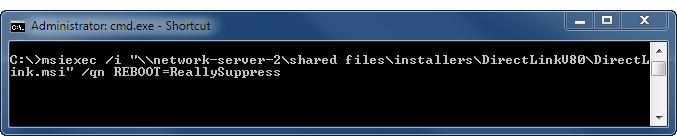
The figure below provides an example of silent installation syntax in the Windows command line.
Extracting the installer files
In order to access the installer files, you need to download and run the Direct Link installation package to extract the two installer files.
The installation package is designed to automatically start the installation process after the files are extracted. If you are using the silent installation option, click Cancel as soon as the files have been extracted.
The default location for the extracted files is:
C:\Program Files (x86)\DirectLinkV802 or C:\Program Files\DirectLinkV802
Run the silent installation
- Double-click the installation package DirectLinkV802.exe and click Cancel as soon as the installers are extracted.
- Open the Windows command prompt as an administrator.
There are different methods for opening the command prompt as an administrator depending on your version of Windows.
This method works for all versions of Windows:
In the C:\windows\system32 sub-folder in Windows Explorer, right-click on cmd.exe and select Run as administrator.
- Run one of the following silent installation commands:
Note
The examples below provide generic syntax only.
Detailed syntax guidelines, and additional information about silent installation and silent upgrade, appear in subsequent sections.
For a fresh installation
Using setup.exe:
"setup_exe_path_and_filename" /s /v"/qr"
Using DirectLink.msi:
msiexec /i "msi_path_and_filename" /qn
For an upgrade
Using setup.exe:
"setup_exe_path_and_filename" /s /v"/qr"Using DirectLink.msi (upgrading from version 6.1 or 7.0):
msiexec /i "msi_path_and_filename" /qnUsing DirectLink.msi (upgrading from version 7.5 or 8.0):
msiexec /i "msi_path_and_filename" REINSTALL=ALL REINSTALLMODE=vomus /qnNote
Specify the full path to setup.exe or DirectLink.msi and enclose the path in quotation marks if the path includes any spaces.
Two installer files
The Direct Link installation package (DirectLinkV802.exe) contains two installer files:
- setup.exe
- DirectLink.msi
You can use either installer file to perform the silent installation or upgrade.
setup.exe
In addition to installing the Direct Link client, setup.exe installs the Microsoft Visual C++ 2015 Redistributable on the target computer if it is not already installed.
For more information, see Installation prerequisites.
DirectLink.msi
The Microsoft Visual C++ 2015 Redistributable must already be installed on the target computer in order to use DirectLink.msi.
If Analytics or Analytics Exchange have been installed in advance of Direct Link, Microsoft Visual C++ is already present on the target computer.
Silent installation guidelines
Review and follow the guidelines below for entering the silent installation command syntax in the Windows command line.
Caution
Not following any of the guidelines will cause the silent installation to fail.
| Guideline | Details |
|---|---|
| Run as administrator |
You need to run the Windows command line as an administrator. Right-click cmd.exe and select Run as administrator. |
| Wrapping syntax |
Do not enter any line breaks in the syntax. Allow the Windows command line to automatically wrap syntax to the next line. |
| Separating parameters | Separate parameters with a space. For example: SAPCONFIGOPTION=INI SAPLOGONINIDIR="C:\SAP configuration files" REBOOT=ReallySuppress |
| Values with spaces |
Any network or file paths that include spaces must be enclosed in quotation marks. For example: SAPLOGONINIDIR="C:\SAP configuration files" |
| Multiple parameters following the /v parameter | Multiple parameters following the /v parameter
must be enclosed in quotation marks. For example: /v"/qr REBOOT=ReallySuppress" |
| Quotation marks within quotation marks | Quotation marks within quotation marks must use a backslash
as an escape character ( \" ). For example: /v"/qr SAPCONFIGOPTION=INI SAPLOGONINIDIR=\"C:\SAP configuration files\"" In the example above, quotation marks are required around the entirety of the three parameters and their values, starting with /qr. Quotation marks are also required around a parameter value that includes a space: C:\SAP configuration files. The escape character must precede each quotation mark in the internal set of quotation marks. |
| Format of quotation marks | If you copy and paste syntax into the Windows command line, make sure any quotation marks are straight quotation marks rather than curly quotation marks. |
Command line parameters
setup.exe parameters
| Parameter | Details |
|---|---|
| /qr | Specifies that the installer runs in silent mode with a reduced user interface. |
| "setup_exe_path_and_filename" |
Specifies the network or local path to the setup.exe installer file. The path must include the file name. Use this parameter if the Microsoft Visual C++ 2015 Redistributable has not yet been installed on the target computer. |
| /s | Specifies that setup.exe runs in silent mode. |
| /v |
Specifies that parameter values will be passed to the installer.
|
DirectLink.msi parameters
| Parameter | Details |
|---|---|
| /qn | Specifies that the installer runs in silent mode with no user interface. |
| msiexec /i "msi_path_and_filename" |
Specifies the network or local path to the DirectLink.msi installer file. The path must include the file name. Use this parameter if the Microsoft Visual C++ 2015 Redistributable has already been installed on the target computer. |
| REINSTALL=ALL |
Note This parameter is required only when upgrading from Direct Link 7.5, or 8.0, to 8.0.2, and using DirectLink.msi. Specifies that the parameters that were specified for the currently installed version of the Direct Link client are reapplied by the upgrade. |
| REINSTALLMODE=vomus |
Note This parameter is required only when upgrading from Direct Link 7.5, or 8.0, to 8.0.2, and using DirectLink.msi. Specifies that the upgrade reinstalls old files and overwrites existing registry entries. |
General parameters – both setup.exe and DirectLink.msi
| Parameter | Details |
|---|---|
| INSTALLDIR=path to Direct Link application files folder |
Specifies the destination folder for the Direct Link application files. If you omit the parameter, the default location is used:
|
| SAPCONFIGOPTION=config_option | Optional. If an SAP configuration file is not in one of the default locations, specifies the type of configuration file used by your installation of the SAP GUI. For the config_option, specify the value matching the SAP configuration file you use:
Note You only need to use the SAPCONFIGOPTION parameter if the SAP configuration file is not in one of the default locations searched by the Direct Link installer. For information about the default locations, see The Direct Link installer search sequence. If you specify SAPCONFIGOPTION, you must also specify one of the parameters that specifies the location of the SAP configuration file. |
| SAPLOGONINIDIR="ini_path" | Optional. Specifies the location of the saplogon.ini configuration file. |
| SAPUILANDSCAPEXML="xml_path_and_filename" | Optional. Specifies the location of the SAPUILandscape.xml configuration file. Note You must specify the file name as well as the path. |
| REBOOT value | Optional. Specify ReallySuppress to suppress all reboots and system prompts during the installation. |
Syntax examples
The table below provides examples of command line syntax for silently installing the Direct Link client.
| Installation details | Required syntax |
|---|---|
|
"\\network-server-2\shared files\installers\DirectLinkV8\setup.exe" /s /v"/qr" |
|
msiexec /i "\\network-server-2\shared files\installers\DirectLinkV8\DirectLink.msi" /qn |
|
msiexec /i "\\network-server-2\shared files\installers\DirectLinkV8\DirectLink.msi" /qn REBOOT=ReallySuppress |
|
msiexec /i "\\network-server-2\shared files\installers\DirectLinkV8\DirectLink.msi" /qn SAPCONFIGOPTION=INI SAPLOGONINIDIR="C:\SAP configuration files" REBOOT=ReallySuppress |
|
msiexec /i "\\network-server-2\shared files\installers\DirectLinkV8\DirectLink.msi" /qn SAPCONFIGOPTION=XML SAPUILANDSCAPEXML="C:\SAP configuration files\SAPUILandscape.xml" REBOOT=ReallySuppress |
