
Document review cycle
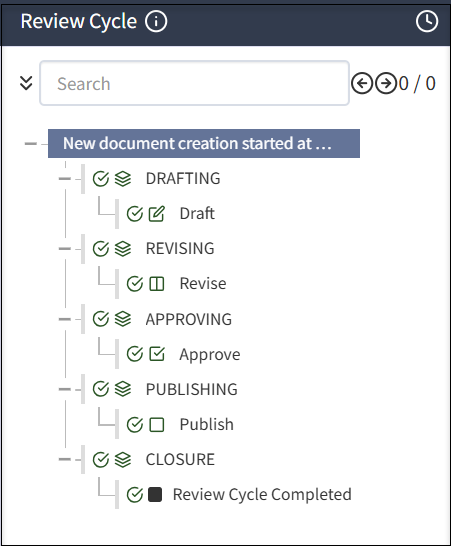
The document review cycle includes the following phases and phase-related tasks: DRAFTING, REVISING, APPROVING, PUBLISHING, and CLOSURE.
Best practice for managing review cycles
Affectez des personnes à des files d’attente d’examen en fonction de leur tâche, comme les réviseurs, les approbateurs ou d’autres. Par exemple, vous pouvez avoir différentes personnes dans des files d’attente comme Examen RH, Approbation RH, Examen juridique et Approbation juridique. De cette manière, vous pouvez assigner un document aux bonnes personnes à la phase appropriée du cycle d’examen.
L’exhaustivité de la révision de la documentation dépend des couches ou de la file d’attente de révision ajoutées lors de la révision d’un document particulier.
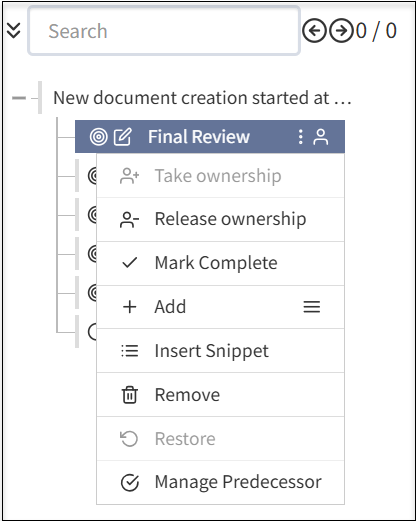
Lorsqu’une file d’attente d’examen est créée, vous pouvez effectuer les actions suivantes :
- Terminez une révision finale en désignant une personne ou des groupes responsables.
- Propriété de la tâche : attribuez ce droit à vous-même pour modifier la documentation.
- Libérer la propriété : libérez-vous de l’édition de la documentation.
- Marquer comme terminé : marquez la révision du document comme terminée.
- Ajouter : sélectionnez l’icône du menu pour ajouter des sous-sections supplémentaires au document. Les étapes supplémentaires comprennent les champs suivants :
- Ajouter une section : ajoutez une nouvelle section à votre document pour terminer la révision du document.
- Ajouter une étape : ajoutez de nouvelles étapes à la section existante du document.
- Ajouter Modifier : ajoutez un composant d’édition supplémentaire à votre document.
- Ajouter Approuver : ajoutez un niveau d’approbation supplémentaire avant de terminer le cycle de révision du document.
- Ajouter Réviser : ajoutez un niveau de révision supplémentaire le document avant de le marquer comme terminé.
- Ajouter Fermer : ajoutez un niveau de fermeture supplémentaire avant de marquer le document comme terminé.
- Insérer un snippet : ajoute des snippets à votre documentation.
- Supprimer : supprime les couches que vous avez ajoutées à votre documentation selon vos besoins.
- Restaurer : restaure la version précédente du document, si vous avez accidentellement supprimé une section ou une couche lors de la révision du document.
- Gérer le prédécesseur : vous pouvez attribuer une tâche prédécesseur avant de terminer un cycle de révision de document.
Il est recommandé d’assigner une file d’attente pour la propriété du document et une autre pour la propriété de la tâche afin de définir clairement les réviseurs, les approbateurs et les propriétaires de document.
It is recommended that Administrators select Enable Auto-assign to each phase of a review cycle to ensure someone has ownership.
Always close out a review cycle. If you do not, the cycle will appear to be open indefinitely. If you have a centralized policy team that manages policies, it is a best practice for that team to start (DRAFTING phase) and close out (CLOSURE phase) a review cycle. If you have a decentralized team, ensure that someone is responsible to close the review cycle.
Tasks in review cycle phases
In each phase, you can have any number and types of tasks. Certain types of tasks can only be added under certain phases, for example, approval task must under APPROVING phase.
The components of tasks in a review cycle includes the following:
- Checkmarks: Select the checkmark
 to complete phases and tasks.
 - Clock: Select the
 clock button to see the date and time for each completed phase.
 - Info: Select the
 info button to see the review flow assigned.
Drafting
In the DRAFTING phase, a document may be written for the first time, or reviewed at the start of a review cycle. To speed drafting, reusable content such as components and widgets can be used. After the DRAFTING phase is complete, the document moves to the next phase and does not return to the DRAFTING phase. For more information, see Creating a document.
Revising
In the REVISING phase, the document is iteratively reviewed and revised. Reviewers in a review queue add comments and may have rights to enter edits in the document. Multiple people are typically involved in a review and several iterations of the review are often required. If a change is made after earlier reviewers have approved the document, the system detects the change, resets the review cycle at the appropriate point, and notifies involved reviewers to view and approve the change.
The REVISING phase is complete when all reviewers have approved the same, final document. For more information, see Revising a document.
Approving
In the APPROVING phase, people in assigned queues examine the document and either approve or do not approve the document and comment on any issues. If the document is not approved, the system reopens the revising phase and notifies appropriate reviewers.
The system manages as many revising/approving cycles as necessary. The APPROVING phase is complete once all approvals are given. For more information, see Approving a document.
Publishing
In the PUBLISHING phase, the document cannot return to an earlier phase. Publishing a document can trigger dependent document review cycles. For more information, see Publishing a document.
Closure
In the CLOSURE phase, any business tasks related to ending the review cycle are executed and the review cycle is complete. The system will initiate a subsequent review based on the review frequency. For more information, see Publishing a document.
Off-cycle reviews
If a document needs to be updated before the next review date, you can start an off-cycle review. For more information, see Starting an off-cycle review.
Due dates and To Dos
At any point, you can select the Review Cycle tab then a task to view the Due by date and who the document will be routed to next in the right pane.
In To Do, select Add to add a reminder for the task and a due date, such as consult a colleague. You can also add notes. If you have active or pending To Do items, you cannot select the Done with Task to close the task.
