
Document review cycle
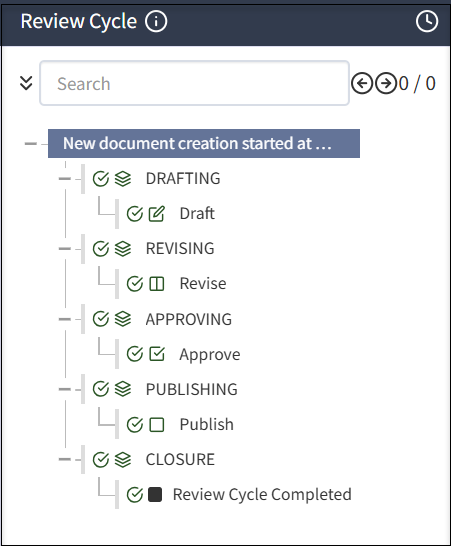
The document review cycle includes the following phases and phase-related tasks: DRAFTING, REVISING, APPROVING, PUBLISHING, and CLOSURE.
Best practice for managing review cycles
[レビュー担当者]、[承認者]、その他のアクションなどのタスクに基づいて、レビュー キューに個人を割り当てます。たとえば、[人事レビュー]、[人事承認]、[法務レビュー]、[法務承認]のようなキューに、さまざまな個人を割り当てることができます。こうすることで、レビュー サイクルの適切なフェーズで、ドキュメントを適切な個人に割り当てることができます。
ドキュメント レビューの完全性は、特定のドキュメントのレビュー中に追加されるレイヤーまたはレビュー キューに依存します。
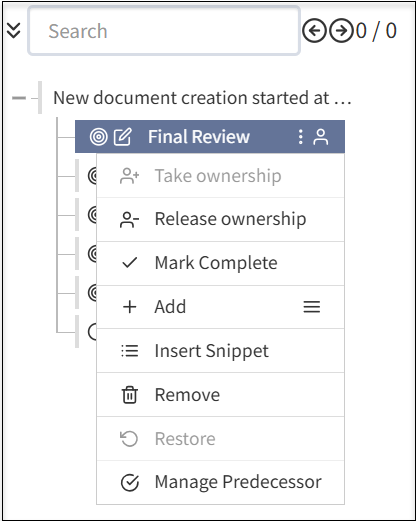
レビュー キューが作成されると、以下を実行できます。
- 個人または所有グループを割り当てて、最終レビューを完了します。
- 所有権の取得:ドキュメントを編集するために自分自身に割り当てます。
- 所有権のリリース:自分自身をドキュメントの編集からリリースします。
- 完了にする:ドキュメント レビューを完了としてマークします。
- 追加:メニュー アイコンを選択して、ドキュメントにサブセクションを追加します。追加の手順には、次のフィールドが含まれます。
- セクションを追加:ドキュメントに新しいセクションを追加して、ドキュメント レビューを完了します。
- ステップを追加:ドキュメント内の既存のセクションに新しいステップを追加します。
- 編集を追加:ドキュメントに編集コンポーネントを追加します。
- 承認を追加:ドキュメント レビュー サイクルを完了する前に、追加の承認レベルを追加します。
- 改訂を追加:完了としてマークする前に、ドキュメントを改訂するためのレイヤーを追加します。
- クローズを追加:ドキュメントを完了としてマークする前にクローズするレイヤーを追加します。
- スニペットを挿入:ドキュメントのスニペットを追加します。
- 削除:要件に従って、ドキュメントに追加したレイヤーを削除します。
- 復元:ドキュメント レビューの実行中に誤ってセクションまたはレイヤーを削除した場合、ドキュメントの以前のバージョンを復元します。
- 先行を管理:ドキュメント レビュー サイクルを完了する前に先行タスクを割り当てることができます。
レビュー担当者、承認者、ドキュメント所有者を明確に定義するために、ドキュメント所有者とタスク所有者にそれぞれ別の人のキューを割り当てることを推奨します。
It is recommended that Administrators select Enable Auto-assign to each phase of a review cycle to ensure someone has ownership.
Always close out a review cycle. If you do not, the cycle will appear to be open indefinitely. If you have a centralized policy team that manages policies, it is a best practice for that team to start (DRAFTING phase) and close out (CLOSURE phase) a review cycle. If you have a decentralized team, ensure that someone is responsible to close the review cycle.
Tasks in review cycle phases
In each phase, you can have any number and types of tasks. Certain types of tasks can only be added under certain phases, for example, approval task must under APPROVING phase.
The components of tasks in a review cycle includes the following:
- Checkmarks: Select the checkmark
 to complete phases and tasks.
 - Clock: Select the
 clock button to see the date and time for each completed phase.
 - Info: Select the
 info button to see the review flow assigned.
Drafting
In the DRAFTING phase, a document may be written for the first time, or reviewed at the start of a review cycle. To speed drafting, reusable content such as components and widgets can be used. After the DRAFTING phase is complete, the document moves to the next phase and does not return to the DRAFTING phase. For more information, see Creating a document.
Revising
In the REVISING phase, the document is iteratively reviewed and revised. Reviewers in a review queue add comments and may have rights to enter edits in the document. Multiple people are typically involved in a review and several iterations of the review are often required. If a change is made after earlier reviewers have approved the document, the system detects the change, resets the review cycle at the appropriate point, and notifies involved reviewers to view and approve the change.
The REVISING phase is complete when all reviewers have approved the same, final document. For more information, see Revising a document.
Approving
In the APPROVING phase, people in assigned queues examine the document and either approve or do not approve the document and comment on any issues. If the document is not approved, the system reopens the revising phase and notifies appropriate reviewers.
The system manages as many revising/approving cycles as necessary. The APPROVING phase is complete once all approvals are given. For more information, see Approving a document.
Publishing
In the PUBLISHING phase, the document cannot return to an earlier phase. Publishing a document can trigger dependent document review cycles. For more information, see Publishing a document.
Closure
In the CLOSURE phase, any business tasks related to ending the review cycle are executed and the review cycle is complete. The system will initiate a subsequent review based on the review frequency. For more information, see Publishing a document.
Off-cycle reviews
If a document needs to be updated before the next review date, you can start an off-cycle review. For more information, see Starting an off-cycle review.
Due dates and To Dos
At any point, you can select the Review Cycle tab then a task to view the Due by date and who the document will be routed to next in the right pane.
In To Do, select Add to add a reminder for the task and a due date, such as consult a colleague. You can also add notes. If you have active or pending To Do items, you cannot select the Done with Task to close the task.
